

Artificial intelligence has changed the way we work, learn, and manage our everyday tasks. Among the many AI tools available today, ChatGPT has become one of the most popular choices for people looking to save time, improve productivity, and find answers to their questions.
Learning how to use ChatGPT Effectively can help you get better results, make smarter decisions, and make the most of this powerful AI tool.
Whether you are a student, business owner, freelancer, content creator, or someone simply curious about technology, this tool can make several everyday activities easier. You can use it to write emails, understand complicated topics, generate new ideas, plan your work, and even learn new skills.
However, there is one thing worth understanding: simply opening ChatGPT and asking random questions does not mean you are using it effectively. The quality of the answers you receive often depends on how clearly you communicate your requirements.
Learning how to use ChatGPT wisely can help you get more useful responses instead of wasting time correcting generic or irrelevant answers.
In this guide, we will explore some practical ways to use ChatGPT effectively, including the steps beginners can follow to get started.
Table of Contents
How to use chatgpt effectively
1. Understand What You Want Before Asking a Question
One of the most common mistakes beginners make is asking vague questions.
For example, imagine you want help writing an article about digital marketing. You simply type:
“Write something about digital marketing.”
The response might contain general information that does not serve your actual purpose.
Instead, try explaining exactly what you need.
For example:
“Write a beginner-friendly article explaining digital marketing. Include its major types, practical examples, and benefits for small businesses. Keep the language simple and conversational.”
Notice the difference? The second instruction gives the AI a clear direction.
Before asking a question, take a moment to identify your objective. Are you looking for an explanation, a list of ideas, a detailed guide, or help solving a particular problem?
The more clearly you communicate your expectations, the more relevant the response is likely to be.
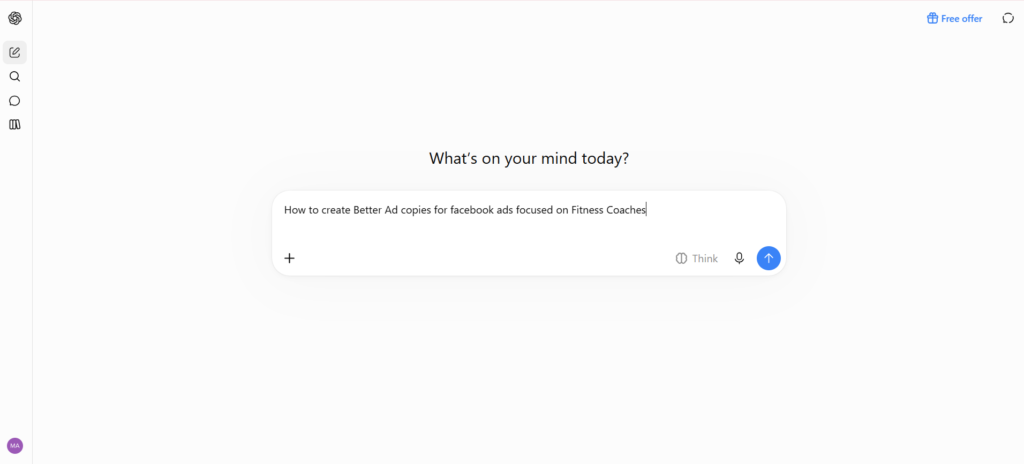
The Question:
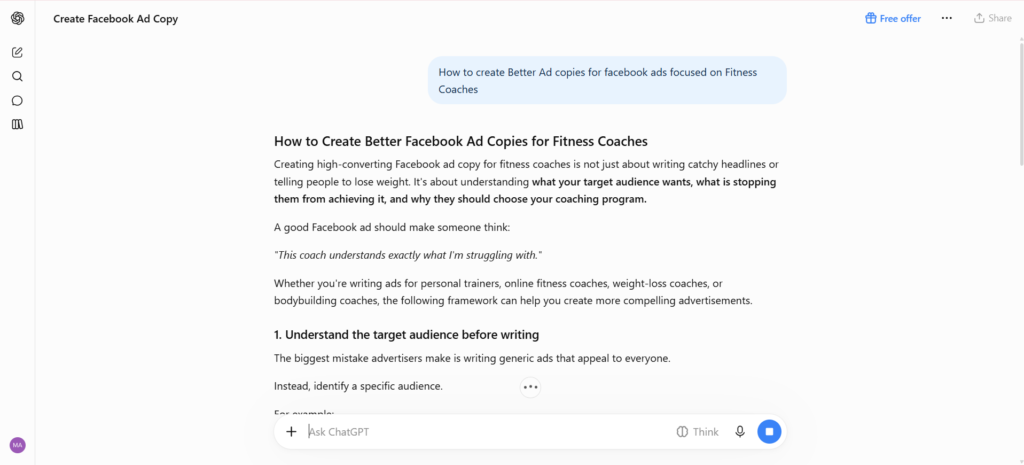
The Response:
2. Learn How to Write Better Prompts
A prompt is simply the instruction or question you give to ChatGPT.
Think of it as communicating with another person. If you provide incomplete information, the other person may misunderstand what you want.
A useful prompt generally includes four things:
- Role: Tell ChatGPT what kind of expert or assistant you need.
- Task: Explain what you want it to do.
- Context: Provide relevant background information.
- Format: Explain how you want the answer presented.
For example:
“Act as an experienced personal finance blogger. Write a 1,000-word beginner-friendly article explaining how to save money on a limited salary. Include practical examples, simple language, and actionable tips. Organize the article using headings and bullet points.”
You do not need to follow a complicated formula every time. Even a simple explanation of your requirements can make a significant difference.
The important thing is to avoid treating the tool like a search box where you enter only two or three words and expect a perfect result.
3. Give It Enough Context
Context is one of the most important elements of getting useful responses.
Let’s say you want ChatGPT to help you create a business plan. If you only ask it to create a business plan, it has very little information to work with.
Instead, explain what kind of business you are starting, who your customers are, what your budget looks like, and what you want to achieve.
For example:
“I want to start a small online business selling handmade products. My initial budget is $500, and I want to target customers in the United States. Suggest a practical business plan that a beginner can follow.”
Now the response has a much clearer direction.
You can also provide additional information during the conversation. If the first answer is not quite right, explain what is missing rather than starting a completely new conversation.
This makes the interaction more productive and helps you work toward a solution that actually fits your situation.
4. Break Large Tasks Into Smaller Steps
Another mistake people make is expecting ChatGPT to complete a complicated project in one instruction.
For instance, if you want to create a website, you might ask it to plan everything, write all the content, suggest a design, and create a marketing strategy at once.
Although it can provide an overview, the result may lack depth.
A better approach is to divide the project into smaller tasks.
Here is an example of how you can approach building a blog:
Step 1: Ask for profitable blog niche ideas.
Step 2: Select a niche and ask for potential article topics.
Step 3: Research the target audience and their problems.
Step 4: Ask for an article outline.
Step 5: Develop each section with relevant information and examples.
Step 6: Review the final article for clarity, accuracy, and readability.
Working this way gives you more control over the outcome. It also allows you to identify mistakes early instead of correcting an entire project at the end.
5. Use ChatGPT for Learning New Skills
You do not have to be a professional or an experienced user to benefit from AI.
One of its most useful applications is learning.
Suppose you want to learn website development but have absolutely no technical background. Instead of searching through dozens of tutorials, you can ask ChatGPT to explain concepts in simple language.
For example:
“Teach me the basics of HTML as if I have never written a line of code. Give me one small lesson at a time and include a practical exercise after each lesson.”
You can also ask follow-up questions whenever something is unclear.
Other skills you can learn include:
- Basic graphic design.
- Search engine optimization.
- Digital marketing.
- Programming.
- Copywriting.
- Personal finance.
- Communication skills.
You can even ask it to test your knowledge through quizzes and practical exercises.
The key is to treat it as a learning assistant rather than a replacement for actual practice. Reading an explanation is helpful, but applying what you learn is what develops a real skill.
6. Improve Your Writing Without Losing Your Natural Voice
Content creators, bloggers, and business owners can use ChatGPT to make their writing process easier.
It can help you generate article ideas, organize information, improve sentence structure, correct grammar, and create initial drafts.
However, there is something important to remember: AI-generated writing can sometimes sound repetitive, overly formal, or unnecessarily complicated.
If you are writing a blog, you do not want every paragraph to sound like a textbook.
A useful approach is to create your initial draft, review it, and then add your own experiences, examples, observations, and opinions.
You can also give instructions such as:
“Rewrite this paragraph in a natural, conversational blogging style. Avoid unnecessary technical words, generic introductions, and repetitive phrases. Keep the original meaning intact.”
This can help make your writing easier to read.
Your personal perspective is what makes your content different from thousands of other articles available online. Use AI to improve your writing process, not to eliminate your personality from it.
7. Ask It to Improve Its Own Answers
You do not have to accept the first response you receive.
In fact, some of the best results come from asking additional questions and refining the original answer.
For example, imagine you ask for ten business ideas and receive a list of possibilities. You can continue the conversation with:
“Which of these ideas requires the lowest investment?”
Or:
“Give me three practical examples of how I could start the second idea.”
You can also ask it to:
- Make an explanation shorter.
- Provide more examples.
- Simplify technical information.
- Compare two different approaches.
- Identify weaknesses in a plan.
- Organize information into a table.
Think of the first response as a starting point rather than a finished product.
This simple habit can significantly improve the usefulness of your conversations.
8. Use It for Everyday Productivity
You might be surprised by how many small everyday tasks can become easier with the help of AI.
For example, you can use it to draft professional emails, prepare meeting agendas, organize your weekly schedule, create shopping lists, plan trips, or summarize information.
Consider someone running a small business who has several responsibilities but limited time.
They could ask ChatGPT to create a weekly task schedule based on their priorities, organize customer feedback, or draft responses to common customer questions.
Similarly, students can use it to organize study schedules, understand difficult subjects, and prepare revision questions.
The idea is not to hand over every decision to AI. Instead, identify repetitive tasks where assistance can save time and allow you to focus on more important work.
9. Always Verify Important Information
This is probably one of the most important points in this entire guide.
Although ChatGPT can provide useful explanations, it is not always correct. Sometimes it may produce outdated information, misunderstand a question, or present incorrect details confidently.
This becomes particularly important when dealing with financial, medical, legal, or technical information.
For example, if you are researching an investment opportunity, do not make a financial decision based solely on an AI-generated response.
Verify important claims using reliable sources, official websites, research publications, or qualified professionals.
You should also be careful when using AI-generated statistics, quotations, references, and product specifications in published content.
Remember that convenience should never come at the expense of accuracy.
10. Experiment With Different Ways of Using It
One of the best ways to become comfortable with ChatGPT is to experiment.
Do not restrict yourself to asking simple questions. Try using it for different activities and observe where it provides the most value.
For example, you could ask it to:
- Act as an interviewer and conduct a mock interview.
- Explain a complicated topic using everyday examples.
- Help you prepare a presentation.
- Review a business idea and identify possible problems.
- Create a beginner-friendly learning plan.
- Help troubleshoot a technical issue.
- Generate creative ideas for a new project.
You can also explore features such as file uploads, image understanding, and voice conversations where available.
The more you experiment, the easier it becomes to understand what the tool can and cannot do.
Final Thoughts
ChatGPT can be an incredibly useful tool when you understand how to communicate with it properly.
You do not need complicated technical knowledge or advanced prompt-writing skills to get started. Begin with clear instructions, provide sufficient context, break larger tasks into smaller steps, and ask follow-up questions whenever necessary.
Most importantly, remember that AI should support your thinking rather than replace it.
Whether you are trying to improve your productivity, learn a new skill, grow an online business, or simply make everyday tasks easier, using this technology wisely can help you achieve more with the time and resources you have.
Start experimenting, find the tasks where it genuinely helps, and gradually develop your own way of working with it. The real advantage does not come from simply having access to an AI tool. It comes from knowing how to use it effectively.
Read More:
1 thought on “How to Use ChatGPT Effectively: A Beginner’s Guide to Getting Better Results”